
Still counting the drawer to see who sold what?
NexStyle puts a tablet on each salon mirror. Two stylists can share it, each signing in with their own PIN to take Cash or QR pay at the chair, and every sale is saved under the stylist who made it. The same tablet can also confirm QR payments by itself, build your customer list and play short videos from local businesses that sponsor your screens.
No card needed to start.
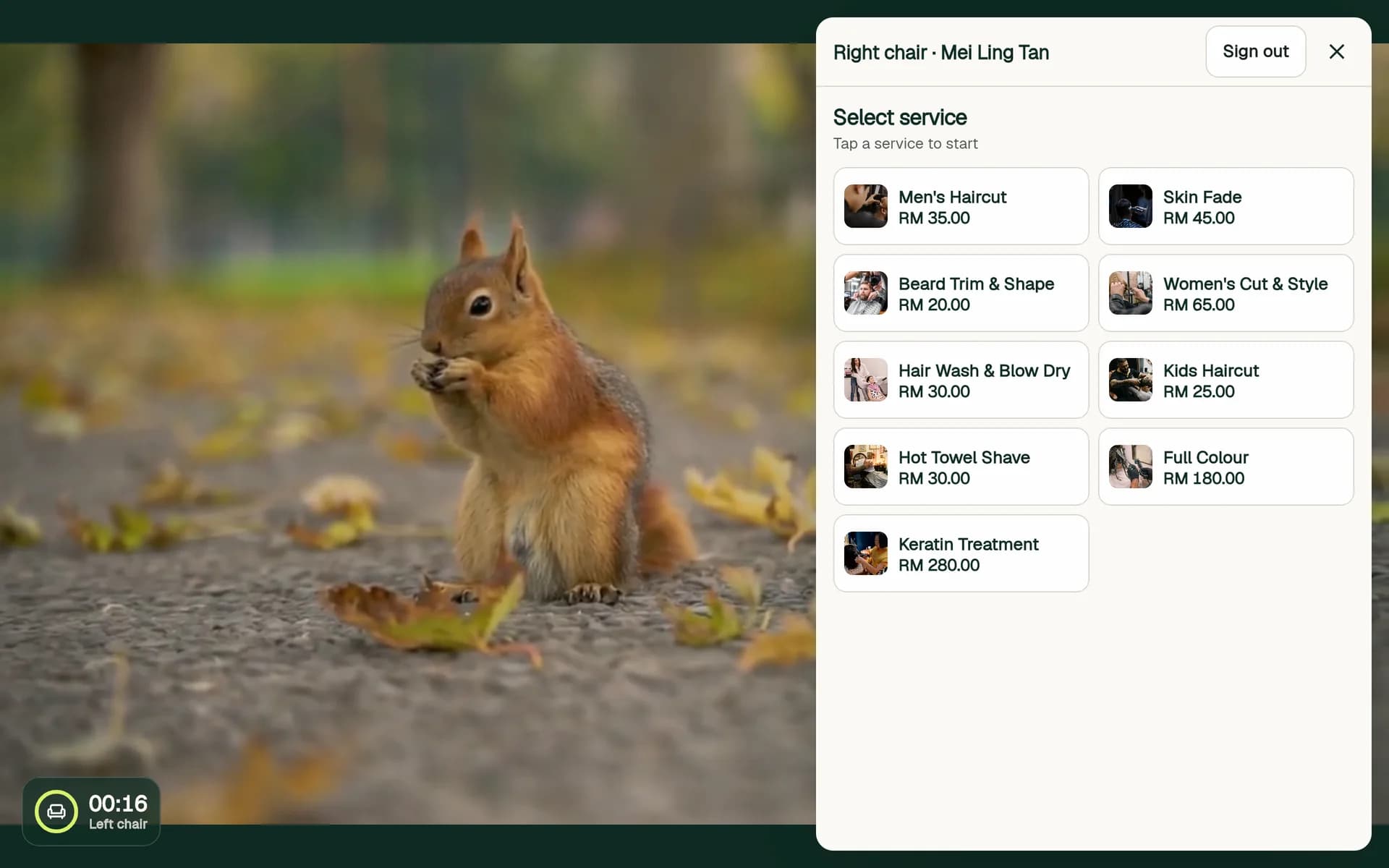
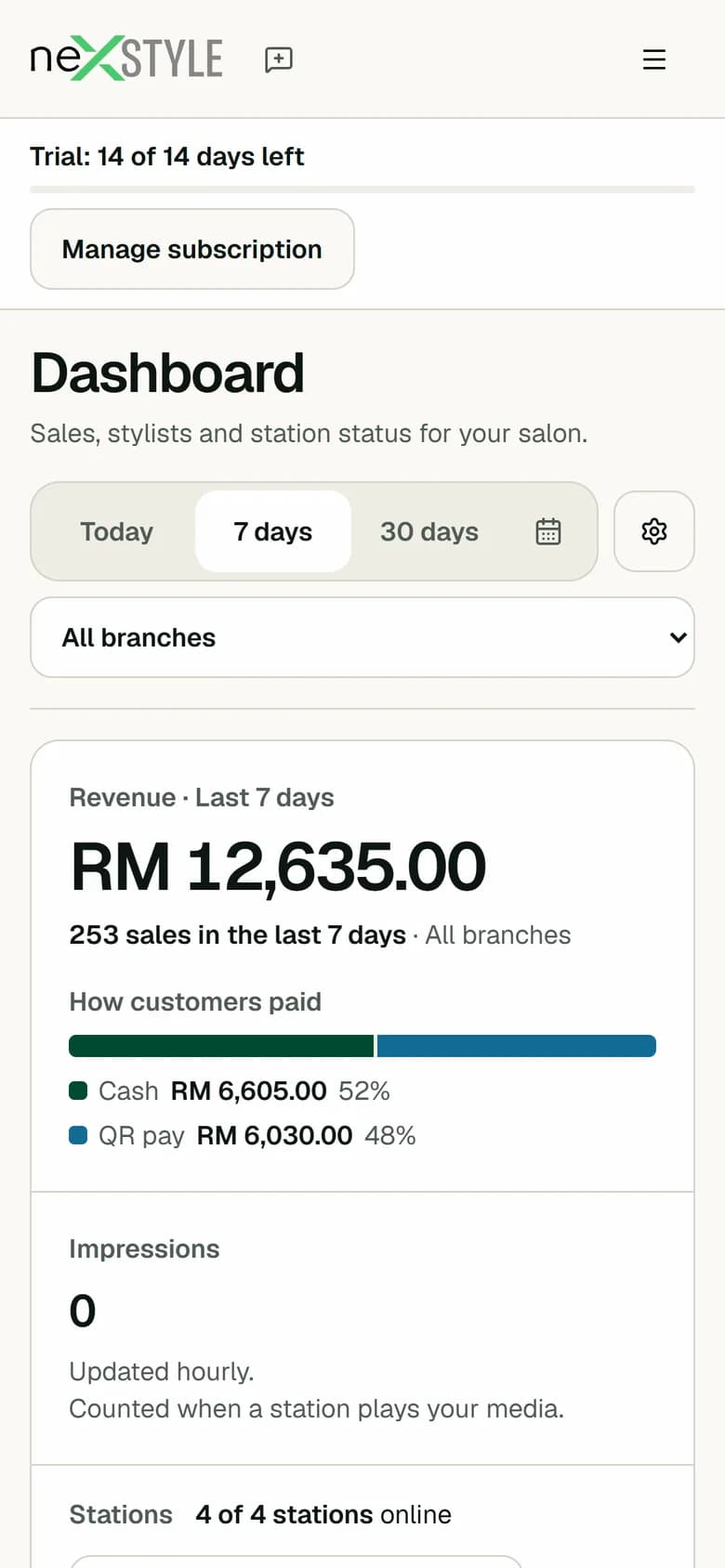
One mirror carries the whole visit.
From the stylist's PIN to the payment, everything happens on the tablet at the chair.
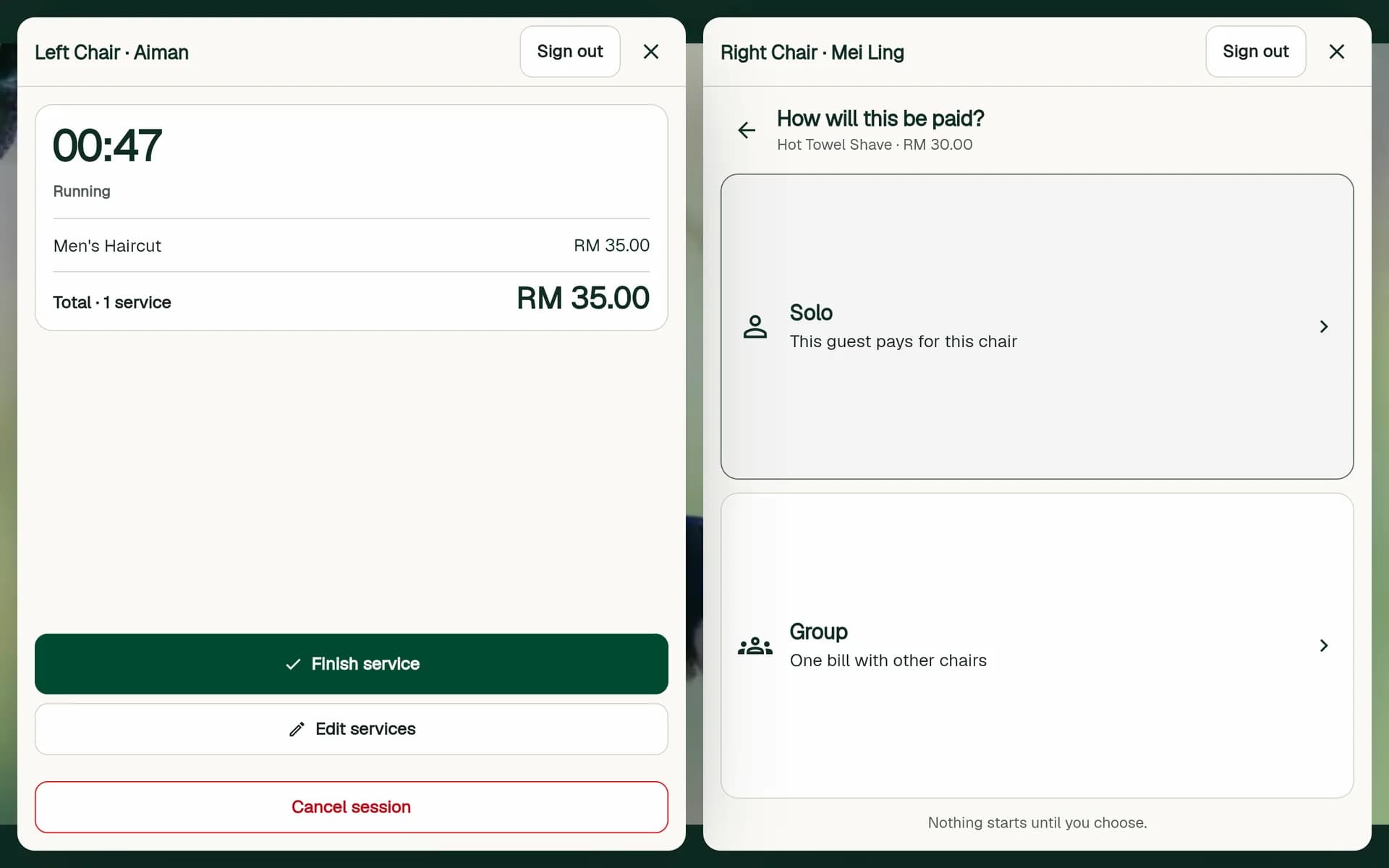
Each stylist works on their own side.
Set a station to two stylists side by side and each chair gets its own panel on the mirror. One stylist can be mid-service while the stylist next to them signs in with their 6-digit PIN and starts the next client.
- Own 6-digit PIN for each stylist
- A separate session for each chair
- Each sale saved under the stylist on that side
Still checking payment screenshots by eye?
Connect your salon's own HitPay account and the tablet shows a DuitNow QR for the exact bill. When the client pays, the tablet sees it and records the sale as paid. Nobody checks a screenshot or types an amount.
At the chair
The stylist taps Pay by QR (auto-confirmed).
The client scans a DuitNow QR for the exact bill.
Within a few seconds the tablet records the sale as paid.
- Where the money goes
- Straight to your own HitPay account. NexStyle never holds it. HitPay's fees apply.
- Ways to pay
- DuitNow QR, plus Touch 'n Go, GrabPay and ShopeePay if you turn them on.
- Checking
- The Payments page lists every QR payment and flags any payment that has no sale.
- No HitPay?
- Your current DuitNow QR keeps working, and the stylist confirms payment as before.
See each stylist's sales without the end-of-day count.
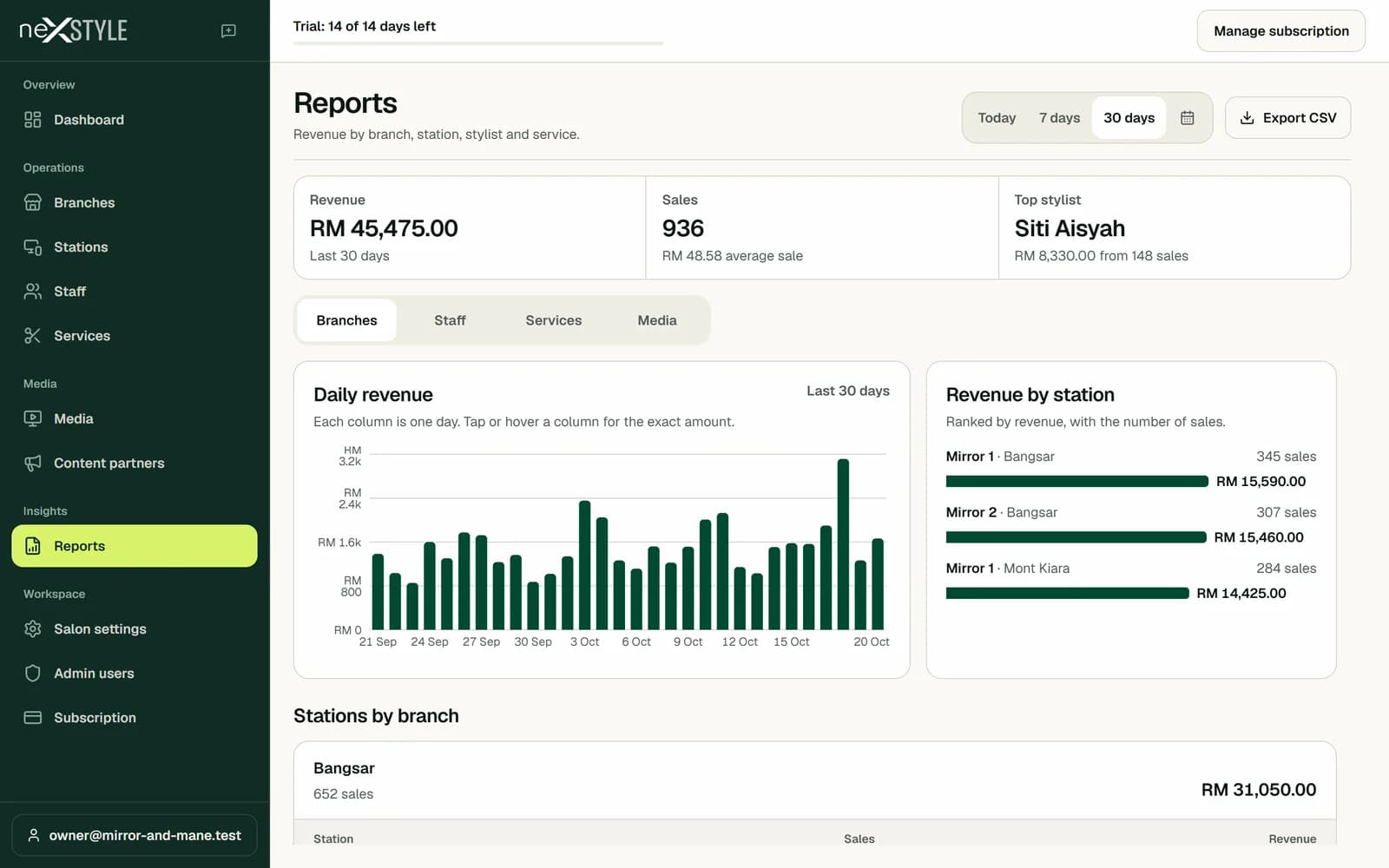
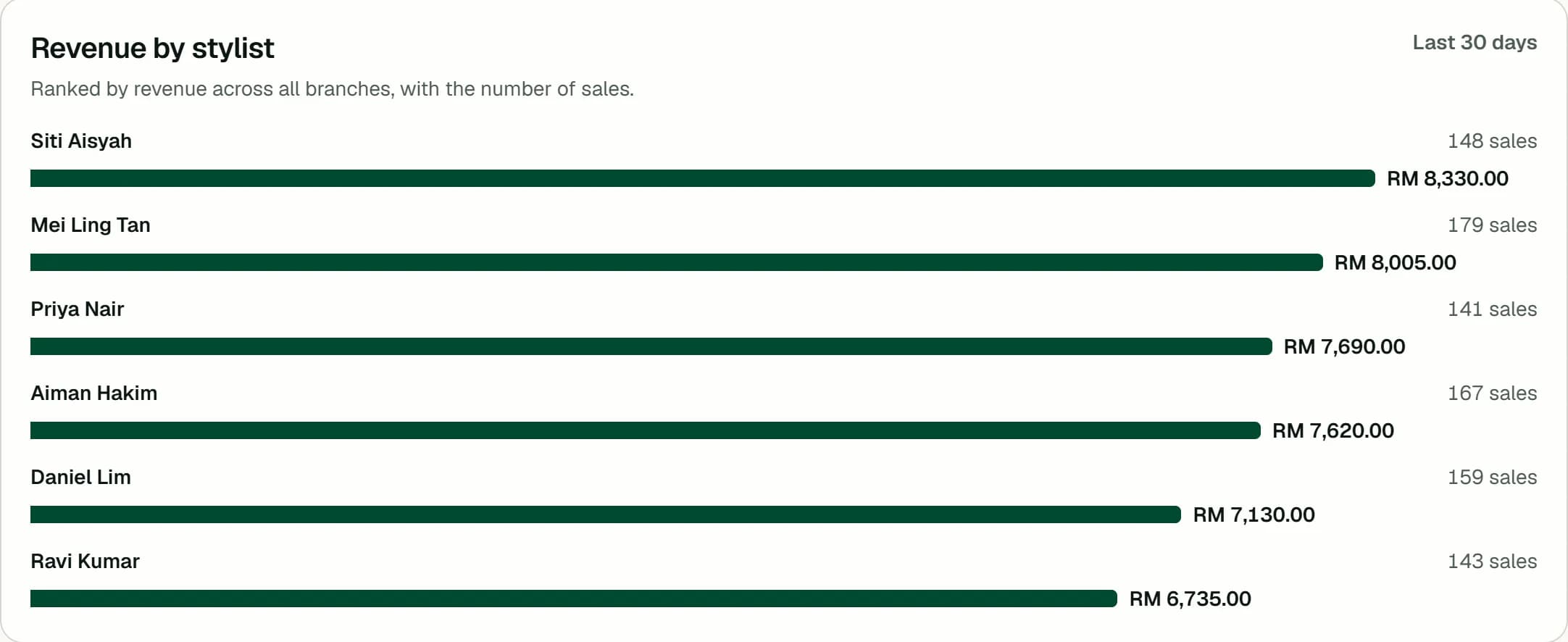
Sales reach your dashboard when the client pays, split into Cash and QR pay. Filter by branch, and open Reports for each stylist's sales.
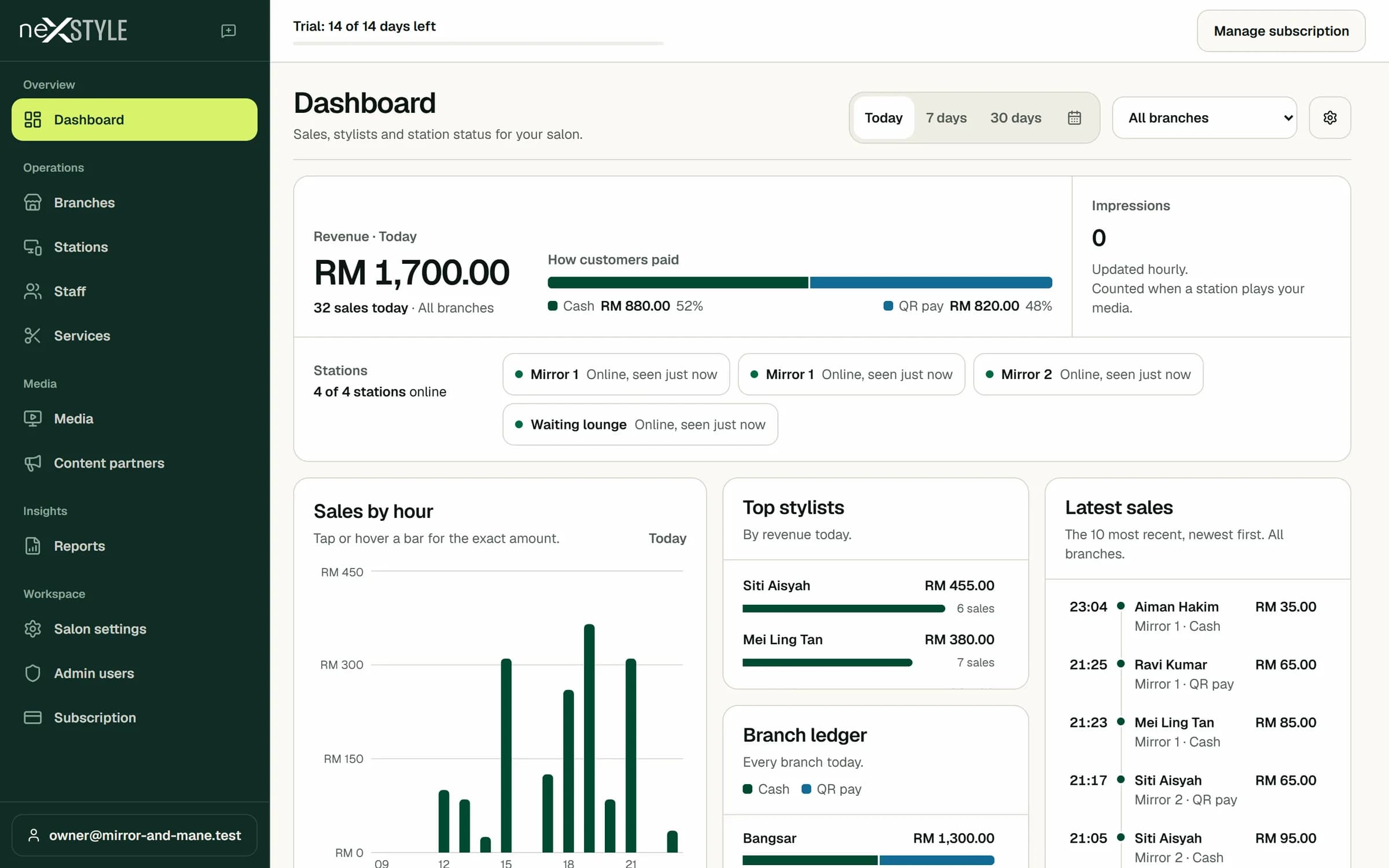
Every branch in one dashboard
Filter the dashboard by branch, and compare Cash and QR pay for each branch in the branch ledger.
Sales and service time per stylist
Reports lists each stylist's sales and revenue for today, 7 days, 30 days or a custom range, with service time from start to finish.
Media you control
Upload your own videos, choose which branches play them, and pause any video from the media library.
Who are your regulars, and who stopped coming?
After a paid sale the mirror tablet shows a Collect your visit QR. Customers scan it with their phone camera and join your customer list, with no sign-up form at the counter.
For your customers
- Scan with the phone camera. No app to download.
- Name, phone and email once, then every visit is a scan.
- A 6-digit PIN they create shows their name, visits and rewards. Until then the card shows the visit count only.
- Birthday and offers are optional, added later on the card. Offers start switched off.
- One card for every branch. They can add it to their home screen to open it in one tap.
For you, on the Customers page
- Each customer's visits, lifetime spend and last visit
- Their last stylist, last branch and last service
- Filters such as no visit in 60 days
- SMS, WhatsApp or email to customers who opted in, from your own Twilio and email accounts
- Automatic thank-you, we-miss-you, reward-ready and birthday messages, each off until you switch it on
NexStyle does not charge for messages. Twilio bills your own Twilio account, and WhatsApp promotions need a template approved by Meta. Customers stop offers from a link or by replying STOP.
The café next door could sponsor the screens in your salon.
NexStyle prints a poster with a QR to your sponsor page. A local business sees your real numbers, books a package and uploads a short video that plays muted for your guests. You watch it and approve it.
The sponsor
- Scans your poster and sees your numbers
- Books one of your packages, such as 1 week, 1 month or 3 months
- Uploads a landscape MP4 of up to 15 or 30 seconds and confirms it holds the rights
- Pays you through your HitPay once you approve, if you charge
- Gets plays per day and per branch
You
Watch the video. Tap Approve.
The video plays without sound on the branches the sponsor chose and stops at the end date by itself.
- Your sponsor page
- Screens, branches, video plays and guests served in the last 7 days, counted from your tablets, with the packages and prices you set once.
- The money
- You set the price or make it free. Sponsors pay your salon through your HitPay, or you arrange payment with them yourself. NexStyle takes no cut and never holds the money.
Pay for active stations, not admin seats.
One price per active station each month. Staff, branches and admin users are not counted.
Price per station
Every feature below, for each mirror tablet you keep active.
- Two stylists per mirror
- Service timer at the chair
- Cash and QR pay
- Sales by stylist, branch and service
- Several branches in one account
- Staff accounts not counted in the price
Your own videos and sponsor videos on the mirrors are included. Billing, your price and the card you pay with live in your NexStrive account.
- What is stored
Your name and email, shared by the NexStrive account you sign in with.
Salon records: branches, stations, staff names and PINs, services and prices, and every sale with its stylist, chair, services, times, amount and payment method.
Videos you upload, with file name, size and dates, and sign-in records such as IP address and access times.
If you connect HitPay, Twilio or an email account, its keys, encrypted before they are stored.
Your subscription card stays with the payment processor in your NexStrive account. NexStyle never sees the card number.
- Where it is kept
Records sit in NexStyle's cloud database and videos in cloud file storage, both run by hosting providers.
Each tablet keeps a copy of its station's services, staff PINs, QR image and videos so it can keep working, plus any sales it has not sent yet.
- Who can see it
You and the people you add to your salon account. A branch you share with another account is visible to them, read only.
Sponsors see only their own videos and payments, not your sales.
Service providers that run hosting, payments and email, and authorities where the law requires it.
- Your customers
With the membership card on, NexStyle stores each member's name, phone, email, visits and offers choice, plus their birthday (day and month, no year) if they add it.
Members see their details only after they create a 6-digit PIN. NexStyle stores the PIN only as a one-way hash, and you, your staff and your tablets never see it.
The customer list belongs to your salon. Customers can change their details or stop offers on their card at any time, and can ask you to delete them. For a customer under 18, get a parent's or guardian's consent before they join.
A member who adds the card to Google Wallet shares their name, stamps, visits and reward codes with Google for the pass. It is optional.
- Deleting it
Ask for deletion in Salon settings, or at /delete-account if you can no longer sign in. Billing records are kept for as long as the law requires.
Questions owners ask
How long is the free trial, and do I need a card?
14 days. You create your salon without a card, and add one in Subscription when you decide to stay.
How is NexStyle priced?
RM 150.00 per active station, per month. Staff, branches and admin users are not counted, and your own videos on the mirrors are included. You add your card and pay in your NexStrive account.
Which payments can stylists take at the chair?
Cash and QR pay. QR pay shows your salon's DuitNow QR on the tablet, so the money goes to your own account, and the stylist confirms once the client has paid. If you connect your own HitPay account, the tablet can also show a QR for the exact bill that confirms itself when the client pays. Card tap on the tablet is not supported.
Read the HitPay QR guideCan I keep my current DuitNow QR?
Yes. Without HitPay the tablet shows your own DuitNow QR as it does today. With HitPay on, your QR stays on the tablet as Shop QR, next to Pay by QR (auto-confirmed).
Does NexStyle take a cut of payments or sponsor money?
No. QR payments and sponsor payments go straight to your own HitPay account, and NexStyle never holds the money. HitPay's own fees apply. You can also make sponsor videos free, or arrange payment with sponsors yourself.
Do my customers need to download an app?
No. They scan the QR on the mirror tablet with their phone camera. The first time they enter their name, phone and email, and every later visit is a scan. To see their name, visits and rewards, they create a 6-digit PIN that works on any phone; until then the card shows the visit count only. The card is a web page they can add to their home screen, and it works in every branch of your salon.
Read the customer list guideWho pays for SMS and WhatsApp messages?
Your salon, through your own Twilio account. Twilio bills that account for each message, and NexStyle does not charge for messages. Email goes out from your own email account. WhatsApp promotions need a message template approved by Meta. Only customers who chose to get offers get messages, and they can stop on their card, by replying STOP or from the link in a message.
Read the win-back guideWhat happens when the salon Wi-Fi drops?
Stylists keep working. The tablet holds a copy of your staff list, services and QR image, so they can sign in, run services and take Cash or QR pay. Sales are saved on the tablet and sent when the connection is back; it tries again every 2 minutes. Group bills need the connection, and a tablet restarted while offline needs the connection back before it can load.
How do I connect a tablet to a mirror?
Add a station in Stations, then select Pair tablet to get a 6-digit code. Install NexStyle POS from Google Play on the Android tablet, enter the code, and the tablet opens the mirror screen for that station.
Read the pairing guide- Pair a tablet to a salon mirrorConnect a mirror tablet to a station with a 6-digit pairing code from the admin. No owner password is typed on the tablet.
- Split one mirror between two stylistsTwo chairs share one mirror tablet. Set the station to two stylists side by side so each signs in and sells on their own side.
- Take DuitNow QR payments at the chairShow your salon's DuitNow QR on the mirror tablet so clients pay at the chair, and the sale is saved as QR pay under the stylist.
- See which stylist sold what todayEvery sale made on a mirror tablet carries the stylist who signed in. See today's sales and revenue per stylist in Reports.
- Build a customer list at your barbershop without a sign-up formCustomers scan a QR on the mirror after they pay and enter name, phone and email once. Every later visit is a scan, with no app to download.
- Win back customers who haven't come in for two monthsList every customer with no visit in 60 days, then send the ones who opted in an SMS, WhatsApp or email from your own accounts.
- Take DuitNow QR payments that confirm themselvesConnect your own HitPay account and the mirror tablet shows a QR for the exact bill, then marks the sale paid when the money arrives.
- Let local businesses sponsor the screens in your salonLocal businesses book a package from your sponsor page and upload a short video that plays muted for your guests. You set the price or make it free, watch the video and approve it.
Put your first mirror on NexStyle.
Create your salon, add a station and pair a tablet. No card needed for the 14-day trial.